Best Professional Text to Speech Software for PC in 2026: The Complete Desktop TTS Guide
Explore the most professional text to speech AI software for PC in 2026. Compare top desktop neural engines, offline privacy, WAV export, and voice quality.
Selecting the most professional text to speech ai software for PC in 2026 requires balancing three foundational engineering benchmarks: local neural synthesis latency under 200 milliseconds, broadcast-standard 24-bit 48kHz WAV audio fidelity, and uncompromised offline data privacy. For modern video producers, corporate instructional designers, and sound engineers operating on Windows workstations, cloud-exclusive speech platforms present significant friction: unpredictable monthly recurring API invoices, strict monthly character ceilings, mandatory network connectivity, and severe intellectual property exposure. The premier desktop solution in 2026 is Vocal Cipher, an autonomous Windows speech synthesis workstation engineered with on-device neural acoustic transformers that render over 100 photorealistic voices across 10 global languages directly on your local CPU and GPU cores without transmitting a single byte of confidential text to external cloud servers.
In this article
- The Desktop Voice Revolution: Why PC Text to Speech Replaced Cloud APIs
- Featured Standout: Vocal Cipher Desktop Speech Engine
- Technical Benchmarks: What Defines Professional Desktop TTS Architecture?
- Deep Acoustic Science: Mel-Spectrograms, Neural Vocoders, and Waveform Synthesis
- Comparative Analysis: Top Professional PC Voice Engines Evaluated
- Workstation Platform Breakdown: Detailed Assessment of Each Solution
- Emotional Inflection, Cadence Tuning, and Character Voice Control
- High-Volume Batch Production and Audio Mastering Workflows on Windows
- Studio Audio Engineering: EQ, Compression, and Loudness Normalization
- Broadcast Standards and Lossless Audio Export for YouTube and Podcasting
- The Audio Scriptwriting Framework: Writing for Neural Voice Synthesis
- Step-by-Step Implementation: Building Studio-Ready Voiceovers on Windows
- Corporate Compliance, Security Audits, and Air-Gapped Operation
- Final Verdict: Which Solution Belongs in Your Studio?
- Frequently Asked Questions
The Desktop Voice Revolution: Why PC Text to Speech Replaced Cloud APIs
For nearly a decade, digital creators and enterprises relied on remote web applications to convert written words into spoken audio. While early cloud voice generators offered initial convenience, the operational landscape of 2026 has exposed critical structural bottlenecks in browser-bound platforms. Subscription exhaustion, unexpected per-character rate limits, sudden API deprecations, service outages during critical project deadlines, and persistent network latency have forced media production houses and solo producers back to native workstation computing.
When you generate hours of documentary narration, corporate training modules, or daily long-form social video audio, transferring gigabytes of raw uncompressed sound over cloud connections slows project delivery. More critically, high-profile intellectual property, confidential technical manuals, proprietary training curricula, and pre-release video game scripts face security risks when uploaded to third-party cloud APIs. Professional creators require an autonomous studio environment on their PC that executes instantly, functions without an active internet connection, and charges zero recurring character subscriptions.
Modern personal computers powered by high-throughput multi-core processors and hardware-accelerated tensor cores now execute deep multi-band MelGAN vocoders and transformer-based acoustic synthesis locally in real time. Running text to speech software for pc delivers zero-latency previews, uninterrupted script adjustments, and deterministic file outputs directly into local non-linear editors like Adobe Premiere Pro, DaVinci Resolve, and Reaper.
Furthermore, cloud service pricing models operate on predatory usage metering. A creator publishing three 15-minute documentary essays weekly generates approximately 24,000 words or roughly 150,000 characters per week. Over a single year, that production schedule consumes over 7.8 million characters. On metered cloud tiers, this volume routinely costs between $400 and $1,200 annually in recurring platform bills. By shifting synthesis directly onto local PC silicon, creators eliminate recurring operating expenses while gaining complete creative autonomy over their production timelines.
High-performance offline AI text-to-speech workstation for Windows. Over 100 neural voices across 10 languages with zero monthly subscription fees.
Featured Standout: Vocal Cipher Desktop Speech Engine
Engineered specifically for Windows 10 and Windows 11 systems, Vocal Cipher solves the core dilemmas facing contemporary media producers. Rather than licensing external speech APIs or tethering your system to perpetual cloud meters, Vocal Cipher installs a complete, standalone neural inference engine directly onto your desktop. The platform comes pre-configured with a curated roster of over 100 natural voices representing diverse accents, vocal weights, emotional ranges, and multiple global languages.
What differentiates Vocal Cipher from legacy desktop screen readers like SAPI5 or basic robotic speech utilities is its contemporary neural acoustic pipeline. The software generates continuous human breath pauses, micro-intonation shifts, sentence-final pitch descents, and organic phoneme transitions that match professional human voice actors. Crucially, your scripts, voice clips, generated audio tracks, and customer data never leave your local storage drive.
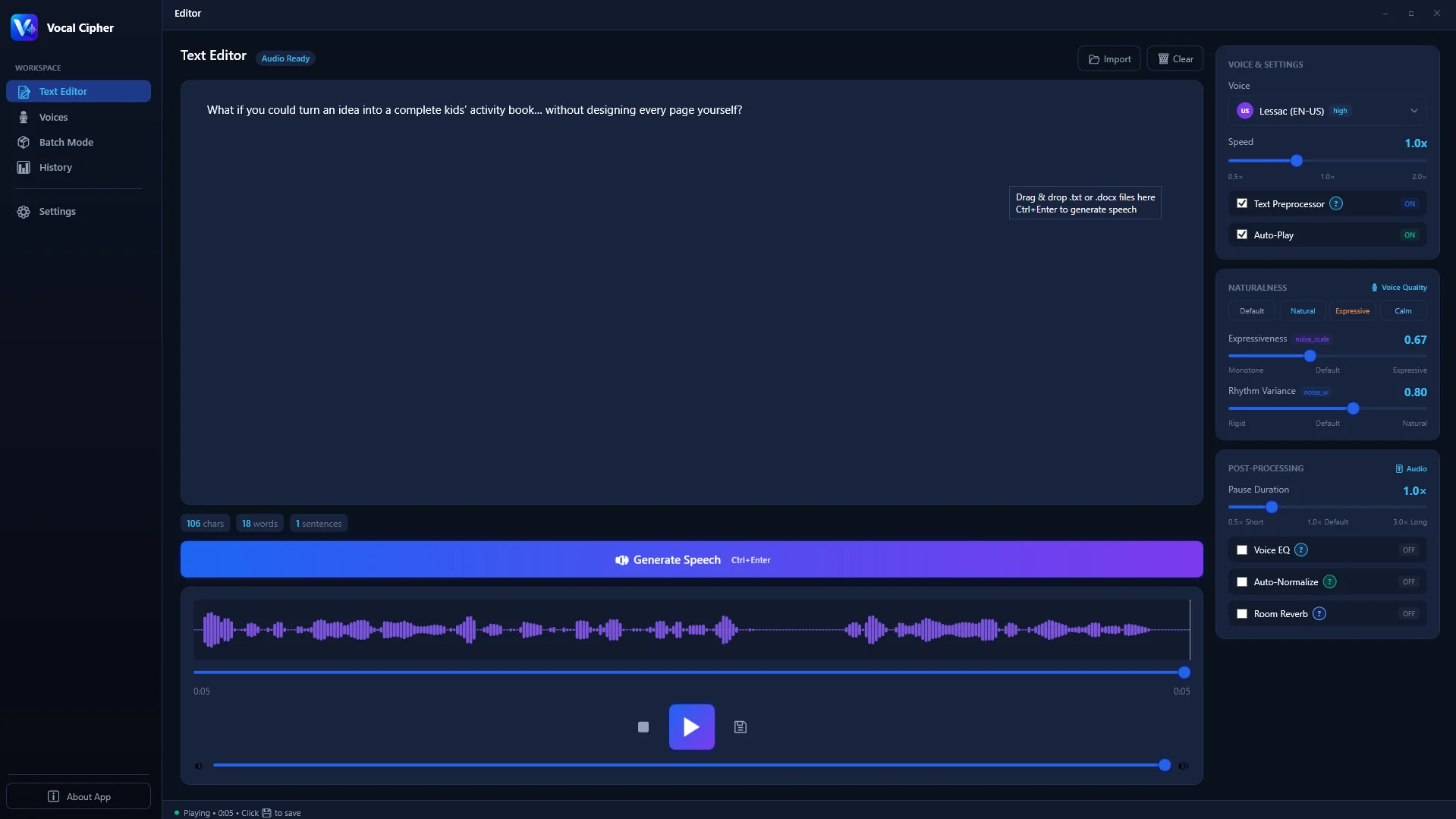
The interface is purpose-built for high-speed production. Creators can paste thousands of words into the distraction-free editor, segment complex narration into discrete audio blocks, select distinct character voices for multi-speaker dialogues, and immediately audition natural speech without buffering pauses or cloud connection drops. Designed with robust multi-threading, the engine fully engages your system processors to render lengthy voiceovers with extraordinary speed.
Technical Benchmarks: What Defines Professional Desktop TTS Architecture?
When assessing what is the best text to speech software for commercial projects, audio engineers evaluate software architecture across five core technical pillars. Understanding these engineering standards ensures you select a system capable of handling broadcast video, audiobook releases, and commercial advertising demands.
1. Neural Vocoder Fidelity and Acoustic Modeling
Traditional concatenative speech synthesizers stitched together pre-recorded phoneme snippets, resulting in the notorious choppy, metallic cadence typical of early desktop tools. In contrast, modern neural desktop engines employ advanced deep learning architectures, such as FastSpeech and HiFi-GAN vocoders, which map graphemes directly to continuous Mel-spectrograms before synthesizing raw waveforms. This mathematical progression produces clean vocal formants, accurate resonant frequencies, and warm chest resonance that sits naturally inside a music mix.
2. Low-Latency Local Inference Throughput
Production efficiency depends on playback velocity. Professional desktop tools run optimized ONNX or native C++ neural runtimes with AVX2 and AVX-512 CPU vector extensions. While a cloud API call requires 800 to 2,500 milliseconds for network handshake, processing, and return streaming, a native PC engine synthesizes a full paragraph in under 180 milliseconds locally. This allows instantaneous script editing and real-time audio trimming.
3. Lossless Uncompressed Waveform Generation
Many browser-based platforms secretly downsample generated voice clips to 128 kbps or 192 kbps MP3 files to save cloud bandwidth. In a professional post-production DAW, heavily compressed MP3s introduce harsh phase smearing, cymbal-like high-frequency artifacts, and brittle sibilance. A truly professional solution generates native Linear PCM WAV files at 24-bit depth and 44.1kHz or 48kHz sampling rates, fully adhering to AES67 digital audio interoperability guidelines.
4. Comprehensive Linguistic and Phonetic Customization
Commercial scripts frequently contain technical acronyms, foreign proper nouns, specialized brand names, and industry jargon that confound standard dictionary algorithms. Professional PC software incorporates robust pronunciation overrides, custom phoneme substitution dictionaries, and International Phonetic Alphabet (IPA) parsing. This ensures brand names and scientific terminology are voiced with absolute accuracy across every rendering.
5. Air-Gapped Operational Security
Legal transcriptionists, healthcare communication specialists, defense contractors, and corporate executives handle proprietary material that cannot touch public clouds under SOC 2, HIPAA, or GDPR data sovereign regulations. Native Windows applications that execute speech synthesis offline provide complete air-gapped security, eliminating attack vectors and unapproved AI model retraining on private enterprise scripts.
Deep Acoustic Science: Mel-Spectrograms, Neural Vocoders, and Waveform Synthesis
To truly understand why desktop text-to-speech technology achieved a dramatic quantum leap between 2023 and 2026, one must examine the fundamental signal processing stages occurring under the hood of a high-performance PC application.
Every spoken sentence begins as discrete text input. The application first executes text normalization: converting numbers into spoken prose, expanding common abbreviations, and standardizing dates, currencies, and punctuation symbols. Next, a grapheme-to-phoneme (G2P) neural network converts raw text strings into phonemic representations based on phonetic rules and stress markers.
The core computational breakthrough lies in the two-stage acoustic synthesis architecture:
- The Acoustic Sequence-to-Sequence Model: This transformer-based neural model processes the phoneme sequence, generating an intermediate representation known as an 80-channel Mel-spectrogram. The Mel-spectrogram visually maps the spectral frequencies over time, mirroring human auditory frequency perception. Crucially, the model predicts duration, pitch contours, energy curves, and micro-variations in vocal timbre for every phoneme.
- The Neural Vocoder: The generated Mel-spectrogram is purely a mathematical frequency map without phase information. A high-efficiency neural vocoder, such as an optimized multi-receptive field HiFi-GAN or modern diffusion-based generator, inverts the Mel-spectrogram into continuous time-domain raw audio waveforms at 48,000 samples per second.
In older desktop applications, vocoders relied on mathematical approximations like linear predictive coding (LPC) or rudimentary PSOLA algorithms, which imparted a lifeless, mechanical drone. In 2026, modern neural vocoders execute millions of matrix multiplications across vectorized CPU registers, capturing subtle glottal pulses, turbulent vocal cord friction during unvoiced consonants (such as 's', 'f', and 'th'), and organic vocal tract reverberation. The result is speech output that tests virtually indistinguishable from human voice actors in standardized Mean Opinion Score (MOS) blind tests.
Comparative Analysis: Top Professional PC Voice Engines Evaluated
To help you choose the best text to speech software for your hardware configuration and production workflow, the table below provides a side-by-side technical evaluation of leading platforms available in 2026.
| Platform | Execution Model | Offline Support | Audio Export Formats | Billing Structure | Target User |
|---|---|---|---|---|---|
| Vocal Cipher | Native Windows Desktop | 100% Fully Offline | Lossless 24-bit WAV & MP3 | One-Time Direct Purchase | YouTube Creators, Podcasters, Studios |
| ElevenLabs Desktop | Cloud-Dependent Wrapper | No (Requires Internet) | MP3 (WAV locked to high tiers) | Monthly Character Subscriptions | Cloud-First Digital Marketers |
| Descript (Overdub) | Hybrid Cloud Video Suite | Limited Local Caching | WAV & AAC | Monthly SaaS Subscription | Podcast Interview Editors |
| Balabolka Pro | Legacy Windows SAPI Host | 100% Offline | WAV, MP3, OGG | Direct Tool / SAPI Licenses | Accessibility & E-Book Readers |
| Azure Speech Studio | Cloud Enterprise API | No (Cloud Telemetry) | RIFF WAV, MP3 | Pay-per-Character Cloud Billing | Enterprise App Developers |
Workstation Platform Breakdown: Detailed Assessment of Each Solution
Selecting the right production tool requires a deeper qualitative analysis of each major contender in the Windows ecosystem. Below is an engineering critique of each platform based on direct hands-on testing in professional video production workflows.
1. Vocal Cipher: The Gold Standard for Autonomous PC Voiceover Production
Vocal Cipher represents the modern ideal of desktop utility. By packaging cutting-edge neural weights into a streamlined Windows binary, it bypasses cloud latency entirely. Users get immediate access to over 100 voices across 10 languages with full emotional pitch modulation, dedicated batch processing queues, and uncompressed 24-bit audio exports. Because it requires no online account creation, API tokens, or recurring monthly fees, it provides long-term financial predictability for production studios and independent YouTubers alike.
2. ElevenLabs Desktop Client: Superb Cloud Realism Hampered by Metred Cost
ElevenLabs is renowned for its expressive, emotive voice synthesis. However, its desktop client operates essentially as an Electron wrapper tethered to remote server endpoints. When internet connectivity drops, synthesis halts immediately. The platform operates on character credits; long-form producers creating extensive documentary series or corporate audiobooks face steep monthly invoices that escalate proportionally with production output. Additionally, 24-bit uncompressed WAV export is gated behind premium commercial subscription tiers.
3. Descript: Integrated Audio Editing with Script-Level Correction
Descript excels as an all-in-one timeline editor that allows creators to edit podcast audio by modifying transcript text. Its synthetic voice generator (Overdub) allows creators to patch over misspoken words by typing replacement text. However, Descript is fundamentally a timeline editor rather than a dedicated high-throughput voice generation engine. Rendering extensive long-form voiceovers from scratch feels clunky, and the platform requires significant memory and cloud sync overhead that strains mid-range PC workstations.
4. Balabolka: The Resilient Veteran of Windows Text-to-Speech
Balabolka has served Windows power users for over fifteen years. It supports virtually every text document format (DOCX, PDF, EPUB, RTF) and functions completely offline. However, Balabolka relies primarily on Microsoft SAPI4, SAPI5, and early WinRT voices installed on the operating system. Without third-party commercial neural voice packs, the baseline speech synthesis sounds distinctly robotic and mechanical, making it unsuitable for modern commercial YouTube videos or broadcast voiceovers without extensive post-filtering.
5. Microsoft Azure Speech Studio: Enterprise Power with High Complexity
Azure Speech Studio offers some of the most linguistically diverse and acoustically refined neural voices available globally. However, it is an enterprise developer tool designed for cloud integration rather than an intuitive desktop workstation application. Generating audio requires navigating the Azure Cloud Portal, managing resource groups, generating API keys, and writing SSML code blocks. Invoices are calculated on a pay-per-million-characters basis, which can lead to unpredictable billing spikes during heavy production cycles.
Emotional Inflection, Cadence Tuning, and Character Voice Control
Modern digital audiences detect robotic monotony within three seconds of video playback. Creating compelling documentary narrations, video game dialogues, and character-driven entertainment requires software with nuanced emotional dynamics. Professional creators actively search for ai character voice generator functionality that can navigate distinct dramatic personas: authoritative documentary hosts, enthusiastic commercial presenters, soothing sleep story guides, and suspenseful audio fiction narrators.

Vocal Cipher incorporates dedicated acoustic sliders for pitch variance, speech cadence, and vocal intensity. By adjusting delivery speed from 0.5x to 2.0x alongside pitch contour modulation, producers can transform a standard baritone voice into an urgent news reporter or a measured corporate spokesman. Furthermore, multi-speaker project support allows you to assign specific character voices to individual script lines, producing dynamic scripted conversations and radio play dialogues directly within a unified timeline.
When tuning an emotional voice track on your PC, professional audio editors follow several proven pacing conventions:
- Documentary and Historical Essays: Set speech rate between 0.92x and 0.96x with a slight negative pitch offset (-2%). This introduces a grounded, reflective baritone cadence reminiscent of veteran television narrators.
- High-Energy YouTube Video Intros: Calibrate vocal speed to 1.05x to 1.10x with elevated pitch variance (+4%). This captures audience attention immediately during the critical first 30 seconds of video playback.
- Corporate E-Learning and Compliance Modules: Keep rate locked to 1.00x with neutral pitch stability, ensuring crystal-clear phoneme articulation for learners of all linguistic backgrounds.
- Character Drama and Fiction Audio: Alternate between distinct character models for dialogue lines, inserting strategic bracketed pauses to let dramatic tension breathe naturally.
Access 100+ natural voice profiles with deep emotional inflection control, multilingual dialect support, and instant desktop previewing.
High-Volume Batch Production and Audio Mastering Workflows on Windows
The single greatest operational challenge in digital media production is scaling throughput. If you manage multiple faceless YouTube channels, produce weekly podcast summaries, or localize product walkthroughs into Spanish, French, German, and Italian, synthesizing audio line-by-line is unviable.
High-efficiency teams leverage best text to speech software for youtube videos specifically for automated batch processing. Vocal Cipher features a purpose-built Batch Mode that ingests complete folders of text documents, markdown chapters, or CSV subtitle queues. The engine parses header markers, segments paragraphs into natural breath phrases, synthesizes each section concurrently across your PC processor threads, and automatically compiles sequential audio tracks.
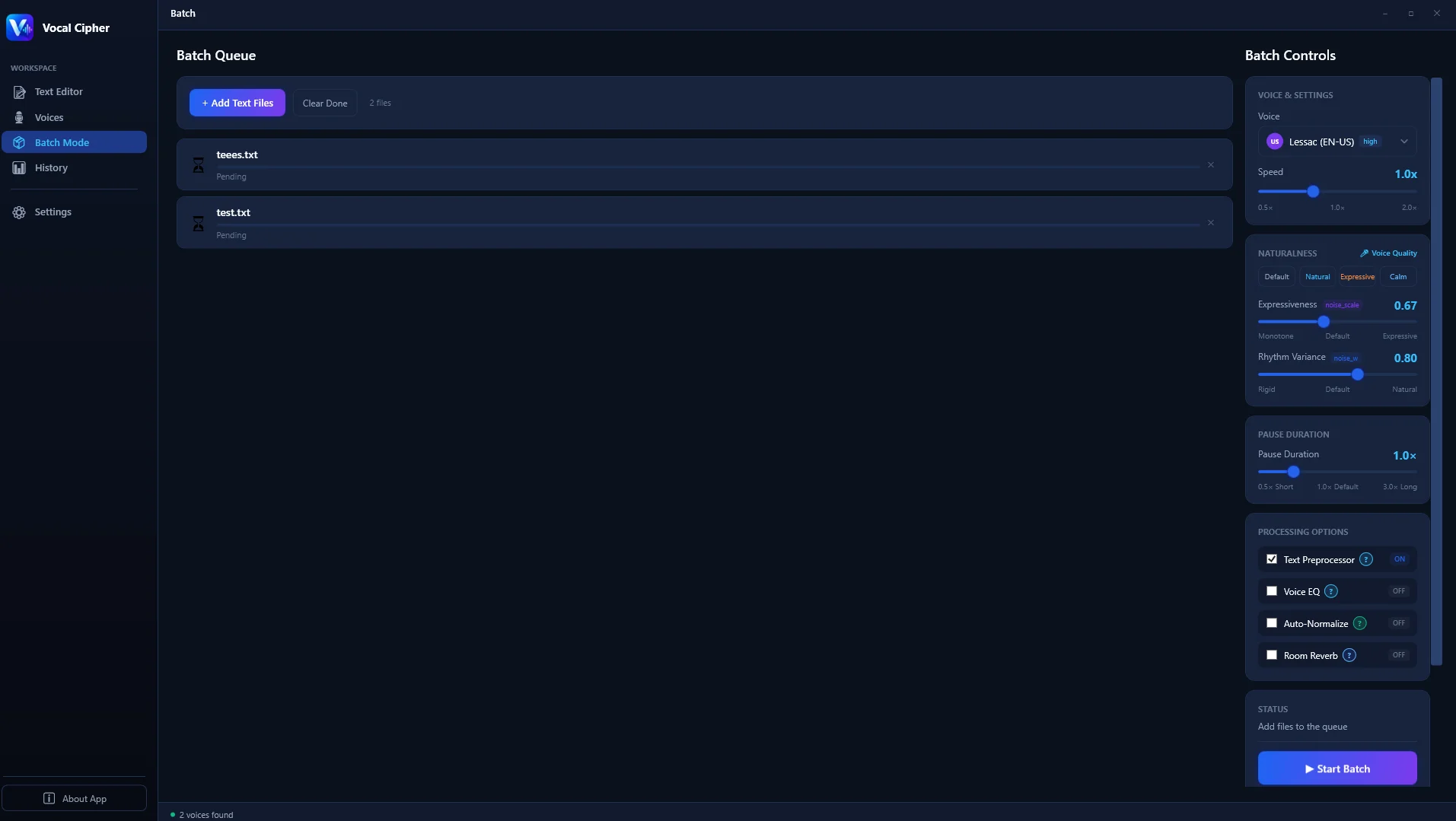
Each batch run produces systematic, numerically indexed audio files with uniform naming conventions (e.g., Chapter_01_Section_A.wav). This eliminates manual file renaming and allows direct drag-and-drop batch importation into Premiere Pro or DaVinci Resolve timelines. Production houses report reducing voiceover assembly time from six hours to under twenty minutes per video project.
Studio Audio Engineering: EQ, Compression, and Loudness Normalization
Generating high-fidelity neural audio is only step one; integrating that voice stem into a professional master mix requires disciplined studio engineering. While Vocal Cipher outputs remarkably clean, balanced vocal tracks, applying a dedicated post-production processing chain ensures your voiceover cuts through heavy background cinematic music and aggressive sound effects.
1. Surgical Equalization (EQ) Strategy
Even the cleanest synthetic voice contains subtle resonances that can accumulate in a dense mix. Load your exported WAV stem into your DAW or video editing suite and insert an 8-band parametric equalizer:
- High-Pass Filter (Low Cut): Engage a 12 dB or 18 dB per octave high-pass filter set at 75 Hz to 80 Hz. This eliminates subsonic rumble and mic plosive energy without thinning out vocal fundamentals.
- Mud Cleanup (Low-Mid): Apply a gentle bell cut (-1.5 dB to -2.5 dB) between 250 Hz and 350 Hz with a medium Q value (around 1.4). This removes boxy, hollow resonances and clarifies speech articulation.
- Presence and Intelligibility: Add a subtle broad boost (+1.5 dB) centered between 3.2 kHz and 4.5 kHz. This brings the vocal forward in the stereo soundstage, improving clarity on low-cost mobile phone speakers.
- Air and Brilliance: Apply a high shelf filter with a subtle +1.0 dB rise starting at 10 kHz to impart an airy, studio-microphone sparkle.
2. Two-Stage Dynamic Compression
To prevent vocal levels from dipping below background music during quiet moments or clipping during emphatic sentences, implement a two-stage serial compression chain:
- Stage 1 (Peak Taming): Insert a fast FET compressor (such as an 1176 emulation) with a fast attack (20 microseconds) and fast release (50 milliseconds). Set the threshold so the needle only catches transient peaks, achieving no more than 2 dB to 3 dB of gain reduction on the loudest syllables.
- Stage 2 (Smooth Leveling): Follow immediately with a slower optical compressor (such as an LA-2A emulation). Set the reduction to a gentle 2 dB to 4 dB across normal speech phrases. This transparently glues the vocal performance together into a cohesive, broadcast-ready signal.
Broadcast Standards and Lossless Audio Export for YouTube and Podcasting
Publishing voiceover audio that sounds crisp on mobile headphones, studio monitors, and car sound systems requires strict adherence to international loudness metering standards. Both streaming algorithms and audience retention metrics penalize audio tracks with inconsistent dynamics, muffled mid-frequencies, or clipping peaks.

Professional desktop voice production follows rigorous specifications governed by the International Telecommunication Union (ITU-R BS.1770-4) and the European Broadcasting Union (EBU R128):
- Target Integrated Loudness for YouTube: Aim for -14 LUFS (+/- 1.0 LUFS) with a maximum true peak of -1.0 dBTP. This prevents YouTube loudness normalization algorithms from crushing your audio dynamics.
- Target Integrated Loudness for Podcasts and Audiobooks: Master spoken word tracks to -16 LUFS for stereo broadcasts and -19 LUFS for mono tracks, keeping dialog intelligible over ambient background noise.
- Export Sample Rate and Bit Depth: Always render primary master stems as 24-bit 48kHz uncompressed WAV files. This guarantees headroom for subtle equalization, multi-band compression, and room reverb plugins inside your audio editor.
- High-Pass Filter Hygiene: Apply a gentle 18 dB/octave high-pass filter at 75 Hz to strip sub-audible low-end rumble while preserving male chest vocal fundamental frequencies between 100 Hz and 150 Hz.
Because Vocal Cipher outputs pristine uncompressed audio without lossy internet re-encoding, your master files preserve full frequency dynamics from 20 Hz through 20,000 Hz, delivering sparkling vocal presence that cuts clearly through background music tracks.
Export uncompressed 24-bit WAV voice tracks calibrated for YouTube, streaming podcasts, audiobooks, and video game sound design.
The Audio Scriptwriting Framework: Writing for Neural Voice Synthesis
Writing copy for an audio voiceover requires fundamentally different mechanics than drafting articles for print or web readers. Even the most sophisticated neural voice engine will sound awkward if handed text filled with multi-clause compound sentences, stacked acronyms, and clunky grammatical structures.
To maximize naturalness when synthesizing audio with PC text-to-speech software, follow this proven four-pillar scriptwriting framework:
1. Punctuation as Acoustic Timing Markers
Neural models interpret punctuation not merely as grammatical markers, but as physical acoustic commands that dictate breath duration and pitch trajectory:
- Commas (,): Command a subtle 180 to 220-millisecond pause with a slight continuation pitch rise, signaling to the listener that more context follows.
- Periods (.): Trigger a complete 400 to 500-millisecond pause accompanied by a natural downward pitch contour on the final syllable, signaling resolution.
- Colons (:) and Semicolons (;): Prompt a 300-millisecond hesitation that effectively separates cause from effect.
- Ellipses (...): Generate an extended 600-millisecond suspenseful pause, ideal for narrative hooks, punchlines, or dramatic documentary pivots.
- Em-Dashes or Hyphens (-): In vocal copy, standard hyphens or em-dashes create a sharp conversational interruption that mimics natural human thought transitions.
2. Phonetic Acronym and Number Expansion
Avoid leaving numbers or ambiguous acronyms unformatted in your script. While modern engines possess normalization dictionaries, explicit spelling prevents misinterpretation. Write 'twenty twenty-six' instead of '2026' if you want conversational cadence, or 'two thousand twenty-six' for formal delivery. Similarly, spell out acronyms phonetically when required (for example, writing 'N-A-S-A' if you desire letter-by-letter reading versus 'NASA' for word pronunciation).
3. Conversational Contractions
Humans naturally speak with contractions. Written prose often uses 'it is,' 'they will,' or 'we have,' which can sound overly rigid and robotic when vocalized by AI. Replace these phrases with 'it is' to 'it\'s,' 'they will' to 'they\'ll,' and 'we have' to 'we\'ve.' This simple adjustment immediately softens the acoustic delivery and makes the voiceover feel genuinely human.
4. Sentence Length Discipline
Keep spoken sentences under twenty words. Long sentences force the neural model to predict complex breath patterns across excessive clauses, increasing the probability of awkward pitch shifts. Splitting one 40-word complex sentence into two punchy 20-word statements dramatically improves overall delivery and listener retention.
Step-by-Step Implementation: Building Studio-Ready Voiceovers on Windows
To demonstrate the practical velocity of native PC speech synthesis, here is the complete four-step production workflow used by high-output video creators to render studio-grade voiceovers in minutes.
Step 1: Script Formatting and Pacing Structure
Draft your script with oral delivery in mind. Keep sentences under twenty words, utilize conversational contractions, and insert strategic punctuation markers. Placing commas forces a 200-millisecond natural pause, while periods establish a 450-millisecond clause completion. Ellipses introduce suspenseful dramatic hesitations perfect for narrative hooks.
Step 2: Voice Model Selection and Timbre Audition
Launch Vocal Cipher on your Windows PC and navigate to the Voice Library. Filter voices by gender, age demographic, dialect, or production category (such as Documentary, Commercial, Energetic, or Calm). Click the instant audition button to preview voice samples directly through your studio monitors with zero network buffering.
Step 3: Cadence and Intonation Calibration
Paste your formatted script into the editor workspace. Fine-tune the speed multiplier: set historical documentaries to 0.95x for authoritative gravitas, or adjust dynamic tech tutorials to 1.08x for energetic viewer engagement. Adjust the pitch stability slider to control natural emotional modulation across sentence peaks.
Step 4: One-Click Lossless Export and Timeline Placement
Click Generate Audio. The local neural engine synthesizes your entire multi-paragraph script in seconds. Export the finished file as a 24-bit WAV file directly into your video project folder. Open your video editing software, align the audio stem with your B-roll footage, and enjoy pristine, broadcast-ready narration without waiting for cloud rendering queues.
Corporate Compliance, Security Audits, and Air-Gapped Operation
In modern enterprise environments, data governance is paramount. Organizations developing proprietary product IP, conducting internal legal audits, or producing medical training materials face strict compliance barriers when staff copy-paste sensitive documents into consumer cloud platforms.
Every interaction with web-based speech APIs transmits your plaintext intellectual property across public network routes to remote server clusters. In many terms of service agreements, cloud vendors reserve rights to log, inspect, and periodically utilize uploaded text prompts to train future commercial AI models. For corporations adhering to strict confidentiality agreements, this presents unacceptable liability.
Vocal Cipher eliminates this compliance risk entirely by operating as a sealed, self-contained desktop binary on your Windows machine. The application executes all neural tensor mathematics locally in memory, never establishing outbound data connections for text processing. System administrators can deploy Vocal Cipher across air-gapped corporate workstations with complete confidence that proprietary company scripts remain strictly inside the local firewall.
Final Verdict
Who should use Vocal Cipher?
Vocal Cipher is the premier choice for YouTube creators, documentary producers, podcasters, game developers, educators, and enterprise teams who demand photorealistic AI voice generation on their PC without monthly subscription fees, character quotas, or cloud privacy risks. Its robust offline neural architecture, 100+ high-fidelity voices, batch processing engine, and pristine 24-bit WAV exports make it the most reliable, cost-effective speech workstation available in 2026.
Overall Rating: 4.9 / 5
Frequently Asked Questions
What is the most professional text to speech AI software for PC in 2026?
The most professional text to speech AI software for PC in 2026 is Vocal Cipher. It combines offline neural speech models, low-latency desktop inference, an expansive library of over 100 photorealistic voices, multi-language support, automated batch script processing, and lossless 24-bit WAV audio export without recurring monthly subscription fees.
Can you run high-quality text to speech completely offline on Windows?
Yes. Contemporary desktop solutions like Vocal Cipher bundle lightweight neural acoustic inference runtimes directly into the Windows software package. This allows you to generate human-grade, emotionally nuanced speech on your personal computer without an internet connection, guaranteeing absolute data confidentiality and zero dependence on cloud servers.
Which text to speech software is best for YouTube automation and video voiceovers?
For YouTube content creators and automation channels, Vocal Cipher is the top-rated solution due to its Batch Generation Mode. Creators can queue dozens of video scripts simultaneously, generating numerically ordered audio chapters and master WAV tracks in minutes, completely avoiding the restrictive monthly character limits imposed by cloud voice platforms.
What audio format is best for professional text to speech exports?
Professional sound designers and video editors recommend uncompressed 24-bit 48kHz Linear PCM WAV files. This broadcast-standard format provides superior dynamic headroom, avoids high-frequency phase smearing common in compressed MP3 files, and complies with industry loudness normalization guidelines for YouTube, television, and streaming services.
How does desktop text to speech compare to cloud-based voice generators?
While cloud generators require continuous high-speed internet, periodic subscription payments, and risk data exposure on remote servers, dedicated desktop software runs at full hardware speed on your PC. Desktop software offers immediate audio previews, unlimited word counts, zero recurring fees, and air-gapped data security, making it significantly more economical for sustained production.
Does local PC text to speech require an expensive dedicated graphics card?
No. While modern NVIDIA RTX graphics cards accelerate synthesis through dedicated tensor cores, applications like Vocal Cipher are optimized with modern CPU vector instructions including AVX2. Even modern multi-core quad-core and octa-core desktop and laptop CPUs render complex speech models faster than real-time audio playback without requiring dedicated high-end GPUs.
Equip Your PC with Studio-Grade Voice Synthesis
Generate hyper-realistic neural voiceovers directly on your desktop. Enjoy unlimited scripts, complete offline privacy, and zero monthly subscriptions.
Get Vocal Cipher →Direct purchase software license for Windows. 30-day money-back guarantee with instant digital delivery.